
HK Primary Interview editorial content · Updated:
The examples and exercises below are illustrative material, not real student case studies or school test questions. Use them for family preparation; check each school’s current requirements before submitting documents.
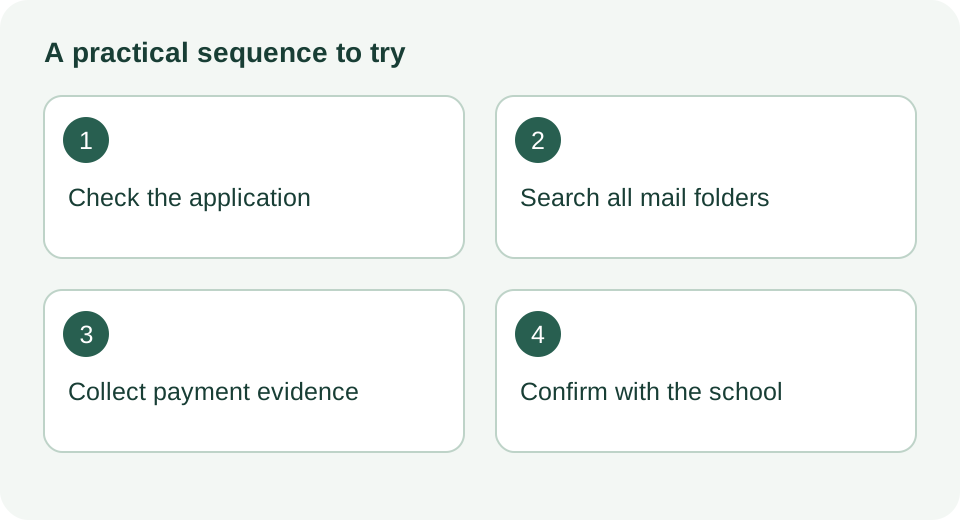
What a confirmation email does and does not prove
Two facts frame everything that follows. Ying Wa Primary School's 2027/28 admissions notice states that once an application is submitted and the fee is paid, a confirmation email follows, and it advises parents to check the spam folder if nothing appears. On a separate track, the Education Bureau's Primary One Admission e-Platform is its own government system with its own official parent guides; a school's private online portal is not ePOA, and the two should not be confused when troubleshooting.
Beyond those anchor points, it helps to be clear about what the missing email means. A confirmation email may simply be a courtesy record. The school's own system may well have your application and your money even though the message went astray. The reverse is also possible: a payment screen that looked successful may not have reached the school's records. Because you cannot tell which from the outside, the job now is to gather evidence methodically and let the school reconcile it.
One more distinction before the practical steps: the confirmation email and the interview invitation are different documents carrying different information. A missing confirmation does not automatically mean a missed interview notice, and neither does a received confirmation guarantee an invitation. Keep the three threads separate in your mind and in your filing.
Further reading: Ying Wa Primary School: 2027/28 admissions notice · EDB: Primary One Admission e-Platform resources
Start with the application record, not the inbox
It is tempting to refresh your mailbox, but the more reliable first move is to log back into whatever channel you used to apply. The record you left behind tells you whether the school's system registered your submission, and it usually holds a reference number that makes any later enquiry far easier for staff to trace.
If the school has an online application portal
Return to the portal only through the official link on the school's own website, not through a bookmark, a message forwarded in a parents' group, or a search result that could be outdated or spoofed. Once inside, look for your submitted application and note three things: whether the status field has changed since you paid, whether a reference or application number is displayed, and whether the payment step shows as completed, pending or blank. Photograph or screenshot the screen showing the reference number. Different schools use different wording and different layouts, so read what is actually on your screen rather than comparing with other parents' screenshots, which may come from a different school's system or a previous year.
If there is no portal, or you applied on paper
Without a portal, collect the evidence you do have: a paper receipt, submission acknowledgement, form copy, payment record or reference number. A bank receipt is not necessarily your only evidence. Search the registered mailbox and contact the school through its stated channel. Missing records can be described in that enquiry; do not wait for a perfect evidence pack when a deadline is close.
Search every corner of your mailbox
A confirmation email can go missing for several reasons, including spam filters, secondary inbox tabs, or an address typed with one wrong character. A disciplined search often settles the question quickly.
Search terms that actually work
Open the mailbox on a computer rather than a phone if you can; desktop interfaces expose folders and filters that mobile apps hide. Search for the school's full Chinese name and its English name in turn, then try the school's email domain, for example the part after the @ sign if you have seen a school address before. Add the words application, admission, confirmation, receipt and payment, one at a time. Finally, search for the amount you paid; many payment or receipt emails include the figure in the body text. Include spam and bin folders in each search, since some providers purge those folders automatically and an email sitting there for weeks may vanish.
Check the address you gave the school
Retrieve your submitted form or payment confirmation screen and compare the email address character by character with your actual mailbox. Common slips include swapping two letters, using a defunct address belonging to a previous employer or an old school account, and entering a parent's address that family rarely checks. If someone else's address is on the form, ask them to run the same searches in their mailbox. If you spot a genuine typing error, that belongs in your message to the school so staff can correct the record going forward; whether and how they can amend it is their call, so frame it as a question rather than an instruction.
Three pieces of evidence, three different meanings
Parents often treat a bank notification as proof of a successful application, but the chain from money to admission has several links and each is a separate record.
A payment record shows the status reported by your bank or payment service, together with an amount and reference. A pending entry does not establish settlement. Ask the payment provider about the transaction and the school whether it has received and matched payment to your application.
Read the confirmation email to see exactly which stage it confirms. Ying Wa states that confirmation follows completed application and payment; another school may issue separate acknowledgements. A missing message warrants checking against that school’s instructions, rather than assuming either success or failure.
The interview invitation, where a school holds interviews at all, comes later and on its own timetable. Not every school interviews, and not all invitations arrive by email; some post letters. If you hold a confirmation but no invitation, one possible explanation is simply that invitations have not yet gone out.
Keeping these apart stops the most common mistake: treating a pending bank charge as a confirmed receipt and then discovering, weeks later, that the payment never completed. Where any link is uncertain, the school is the only party that can confirm the true position.
File your payment evidence so it is ready to send
Put available records in one folder, for example SchoolA_2027_records: the submission acknowledgement, application number, payment screen and relevant receipt. This folder name is illustrative. You do not need to send a screenshot of your entire mailbox to demonstrate that an email is missing. State which address and folders you checked.
Redact before you share. Blank out the full card number, leaving at most the last four digits, your full Hong Kong Identity Card number, and any other children's names that appear in a shared banking screenshot. If you post in a parents' forum or chat group to ask whether others face the same problem, apply the same redaction there; screenshots circulate further than you expect.
Write down a short timeline while your memory is fresh, for example: submitted the form at 9.40 pm on 15 September, paid HK$50 by credit card at 9.47 pm, no email by noon on 17 September. Note the amount you paid only from the school's own published fee figure, and treat every timing example here as illustrative rather than a rule about any school's processing speed.
Match your situation to the next step
Most parents fall into one of four situations. The table below suggests a proportionate response for each; it describes possibilities, not diagnoses, and the school's reply is what settles the matter.
| Your situation | Possible explanations | Next step |
|---|---|---|
| No charge on your card and no reference number | Payment may not have completed at all | Check with your bank whether the transaction exists before anything else, then contact the school with what the bank says |
| Charge shows, but no confirmation email after checking all folders | Email delayed, filtered, or sent to a mistyped address | Send the school your evidence pack and ask them to confirm receipt and check the address on file |
| Confirmation email received, but no interview invitation | Invitations not yet issued, or issued by post or at a later stage | Read the confirmation email itself for the stated timeline, then wait the interval it describes before chasing |
| A stated stage deadline falls within days | Any of the above, but with time pressure | Telephone the school office in school hours the same day and follow up in writing, quoting the exact deadline |
Email the school a message that is easy to answer
Admissions staff handle a high volume of enquiries during the application season. A short, specific message with a reference number and dates is far likelier to get a fast, useful reply than a long anxious one. The wording below is a neutral template; fill in the bracketed details and delete anything that does not apply.
Subject: P1 application status enquiry [reference number if any, or child's name as on form]. Dear admissions team, I submitted an online P1 application on [date] at approximately [time] and paid the application fee of [amount] by [payment method]. The charge appears on my card statement dated [date]. However, I have not received a confirmation email. I have checked my inbox, spam and bin folders and searched for the school's name, and found nothing. Please could you confirm whether my application and payment have been received, and whether the email address on the form [address] was entered correctly? I can be reached at [address] or [phone]. Thank you for your help. Yours faithfully, [name].
Send it to the admissions or general office address published on the school's own website, and keep a copy of the sent message with your evidence pack. If the school lists a phone number for admissions queries and the matter is time-sensitive, a morning call followed by the same email gives you both a fast channel and a written record. Ask what the school needs from you rather than assuming extra documents will be accepted; acceptance of supplementary material is each school's own decision.
Handover notes for two-parent households
In many families one parent runs the whole application and the other knows only that an email is missing. If that parent travels, works irregular hours, or is simply the one home when the school calls, a one-page handover note prevents a missed call becoming a missed stage.
Write down, in plain terms: the school's name and the entry year applied for; the date and time of submission and payment; the amount and payment method; any reference number; the email address used on the form; where the evidence folder is saved and on which device or cloud account; and the date you emailed the school. Add the admissions contact details and one line on what has been asked of them. Store it somewhere both parents can reach, and mention it to whoever answers unknown numbers during the application period.
What not to do while you wait
The strongest urge after silence is to submit the form again or pay the fee a second time, on the theory that a duplicate is safer than a gap. Resist it. A second application can create two records that the school must untangle, and a second charge may be difficult to reverse. Similarly, do not apply through a different channel, such as a paper form, until the school has told you the status of the first attempt.
Also avoid drawing conclusions from other parents' experiences in group chats. Processing speeds, email behaviour and even fee amounts differ between schools and between years, so another family's silence and eventual success proves nothing about yours. Treat any date, fee or timeline in this article as illustrative unless the school or the Education Bureau has published it.
If a published deadline for the next stage is genuinely imminent, telephone rather than wait for an email reply. Say plainly that you paid on [date], have received no confirmation, and are calling ahead of the [named] deadline. Ask what the school needs from you by that date. Resolving this by phone before the deadline is safer for everyone than waiting for an email reply that may not come in time.
The action for today: open a computer, run the mailbox searches described above, save your payment screenshot into a named folder with the card number redacted, and if nothing surfaces, send the school the enquiry email before the payment record ages any further.
Frequently asked questions
My banking app shows the charge as pending. Does that mean the school has been paid?
A pending transaction does not confirm that the school has received payment or accepted the application. Ask the payment provider about its status and the school to reconcile the application record. Do not pay again unless the school’s instructions resolve how to proceed.
Should I just pay the fee again to be safe?
No. A duplicate payment can create two records that take time to untangle and may be hard to reverse. Send the school your payment evidence and ask them to confirm the status of the first attempt before any second payment.
Can I fix the application if I mistyped my email address on the form?
Raise it directly with the school in your enquiry email, quoting the incorrect address and the correct one. Whether the school can amend the record, and how, is their decision, so ask rather than assume, and keep using the correct address for any correspondence meanwhile.
Does the Education Bureau's Primary One e-Platform have anything to do with my school's application fee?
They are separate systems. The EDB e-Platform is a government system for Primary One admission with its own published parent guides, while a school's own online application portal and fee payment sit on the school's side. Check with whichever system you actually used, and do not expect one to show the other's records.
Discussion background and sources
This topic was informed by search-index excerpts of the public discussion below; the complete thread could not be retrieved directly. Historical comments identify a parent question, not current admission rules or admission chances. Consult the official sources and the notice addressed to your family.
- Education Kingdom: 請問有冇人知小一交表報名費點交? (2015 discussion) — discussion background
- Ying Wa Primary School: 2027/28 admissions notice — official source
- EDB: Primary One Admission e-Platform resources — official source
Sources checked:
Put the preparation into practice
Find schools and official websites · Parent-child practice games · Editorial policy